

Capsla

A quiet timer for focus and breaks

Focus, a short break, and after a few rounds a long one. The capsule here is a real timer, and the rings around it are the same Orbital background as in the app. Press play.

Download on the App StoreDownload on the App Store

Free, with no ads. For iPhone and Apple Watch.

Focus time

25:00

Background palette

A session that runs on its own

Turn on auto-start and focus, break and the next focus follow one another without a tap until the long break. Breaks and focus switch on separately, so you can rest on cue and come back to work when you choose.

Every transition is scheduled ahead, so the session keeps going with the app closed and the signal for the next phase arrives on time.
The timer is wherever you look

A Live Activity and the Dynamic Island, the Lock Screen, widgets, Control Center, the Action button. Ask Siri to pause and the answer comes with a card and buttons for the next step. You rarely need to open the app.

Capsla has its own Apple Watch app: start and pause from your wrist even when your iPhone isn’t nearby, and feel a tap when a phase ends. Phases you finish on the watch count in your statistics on iPhone.

Social apps can wait until focus ends

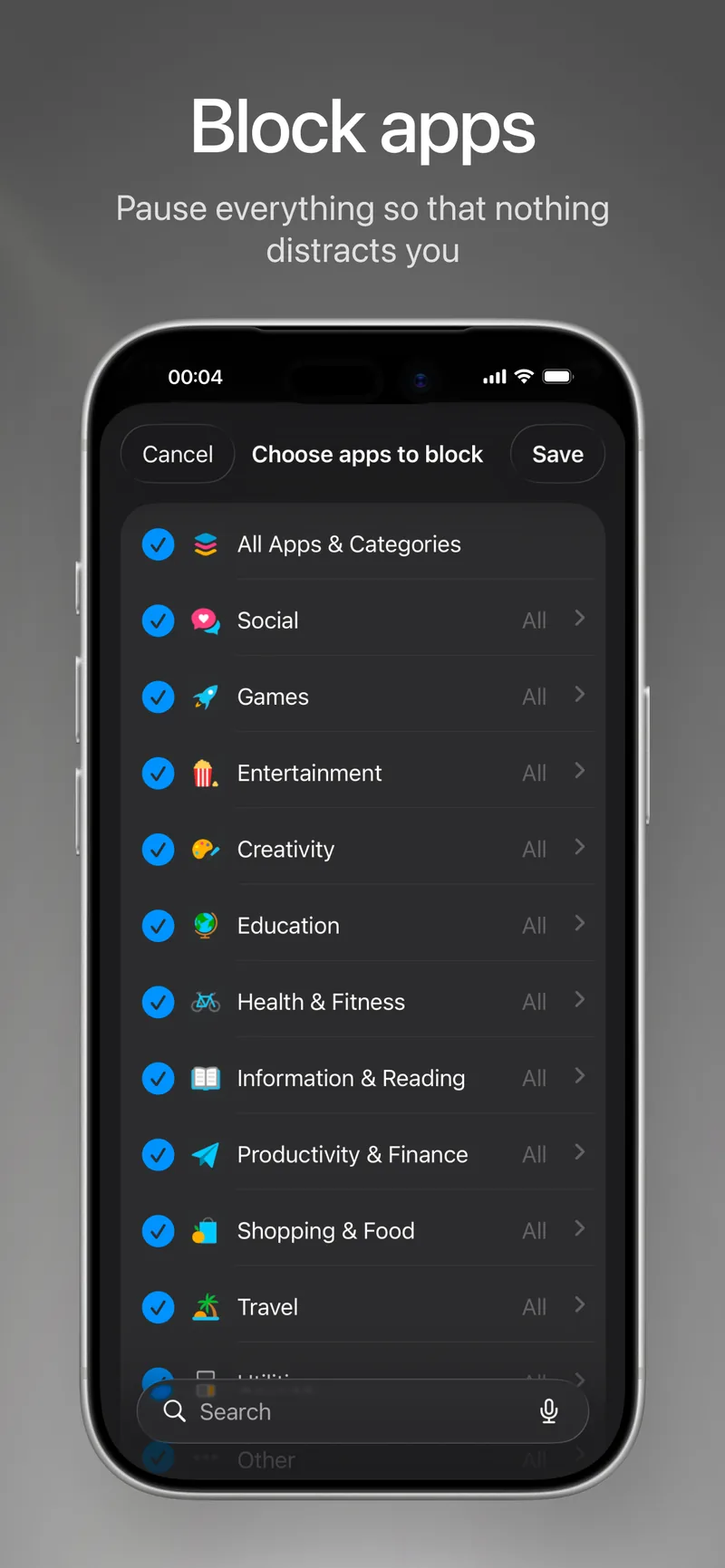
Pick the apps that pull you away and Capsla blocks them during focus through Screen Time, then lifts the block the moment the phase ends. Open a blocked app and you’ll see a Capsla screen instead.

App Store screenshot: choosing apps to block

Where your attention went

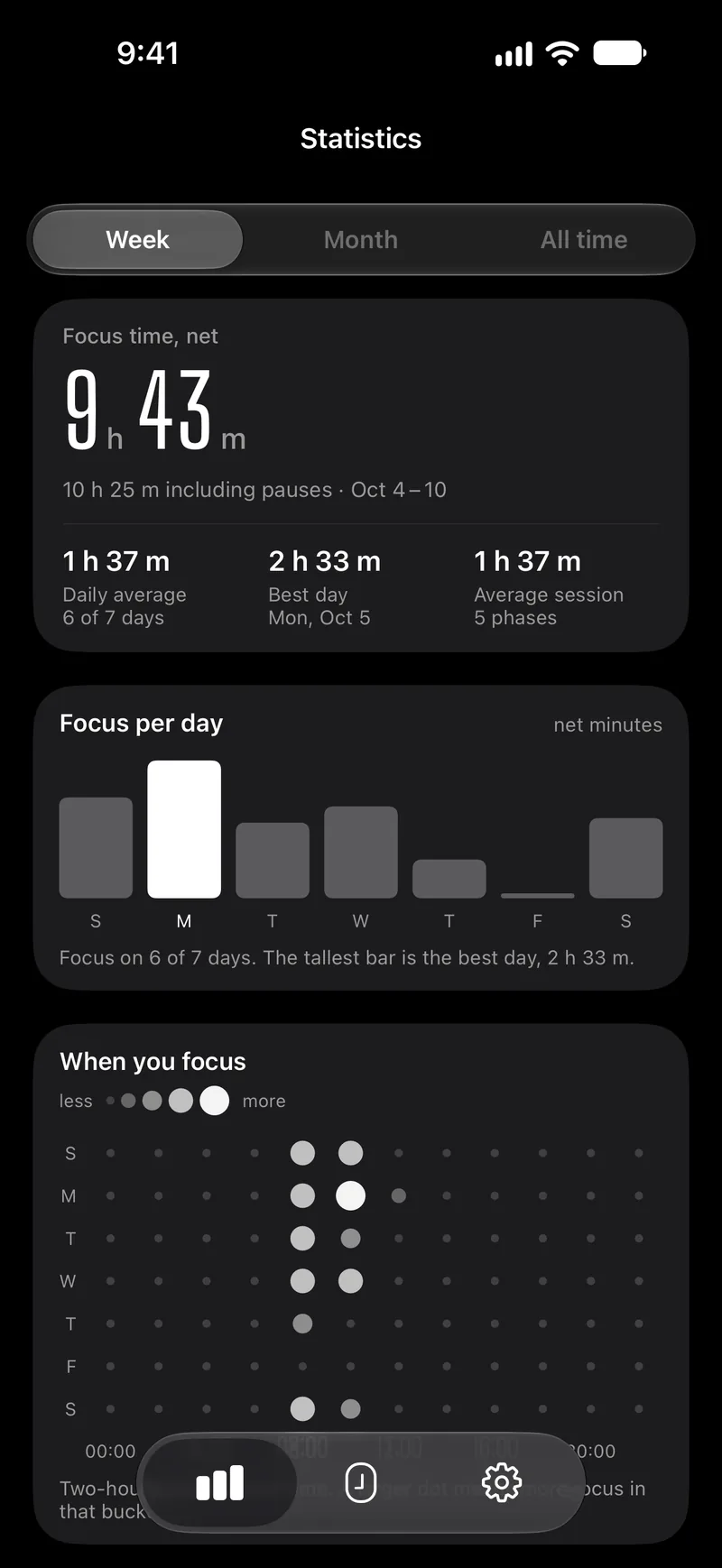
Net focus time by week, month and all time, a chart by day, the hours you focus best, days in a row and time by tag.

History starts the day you install Capsla, and the app never fills in numbers it did not record. Export all of it as a CSV file whenever you like.

The Capsla statistics screen for a week: 9 h 43 m of net focus, bars by day and dots by hour of the week

Quiet, but hard to miss

A quiet heads-up a few minutes before focus ends, a signal when a phase is over, buttons to start the break or the next focus right from the banner, and a reminder if you forget to come back after a break. Notifications are Time Sensitive, so they come through Do Not Disturb.

The end-of-phase signal plays even in silent mode, because a missed transition defeats the point. There are 16 sounds and three vibration patterns, chosen separately for each phase.

And also

You can see what leaves your phone

There is no Capsla account. Tags and focus history sync only through your own iCloud, and settings stay on your iPhone.

The Privacy screen lists the recent events Capsla itself has sent. It’s a real list from your device, and two switches turn collection off.

Privacy policy

The essentials are free and stay free

Capsla+ is a one-time purchase with no subscription, shared with your family. It adds looks and sound only.

What’s in free Capsla and in Capsla+
FeatureFreeCapsla+
Timer, auto-start and notifications●●
The Apple Watch app●●
Blocking apps during focus●●
Statistics, Health and Calendar●●
Tags, widgets, Siri and Shortcuts●●
Four animated backgrounds and 16 sounds●●
New backgroundsFive more live timer backgrounds.—●
Accent and palettesAn accent color for the whole app and new palettes for the backgrounds.—●
Timer digitsNew typefaces for the countdown on iPhone and Apple Watch.—●
Celebration effectsOther effects when a cycle ends, instead of confetti.—●
Focus soundsBrown, pink or white noise in the background while you focus.—●
Watch and widgetsYour accent and digits on widgets, the Live Activity and Apple Watch.—●

Nothing that was free moved behind Capsla+, and there are no pop-ups asking you to buy.

Questions

Is Capsla free?

Yes, with no ads. The timer, the watch app, app blocking, statistics, tags, widgets and Siri are free. Capsla+ is an optional one-time purchase for looks and sound.

Do I need an account?

No. History and tags sync through your iCloud; there is nothing to sign up for.

Does the timer keep running if I close the app?

Yes. The phase keeps counting with the app closed: the time shows on the Lock Screen and in the Dynamic Island, and a notification arrives when the phase ends.

Why does the signal play in silent mode?

On purpose: otherwise a transition is easy to miss, and the whole point of a timer is that you stop watching it.

Does the watch need my iPhone nearby?

No. You can start and pause focus from the watch even when your iPhone isn’t nearby.

Which devices does Capsla run on?

iPhone with iOS 26 or later and Apple Watch with watchOS 26 or later. On iPhone Duo, Capsla uses both the outer and the inner display; half-folded, the timer sits on one half, away from the fold. There is no iPad version.

Try it on your iPhone

Free, with no ads and no account.

Download on the App StoreDownload on the App Store